Google Tag Manager Trigger Groups Can Reference Themselves
A technical look at a GTM UI bug that allows a Trigger Group to reference itself, why that matters, and how GTM Refine now detects it.
The Short Version
I recently found a strange Google Tag Manager UI issue while checking a client's container: a Trigger Group was referencing itself.
That should not be a valid configuration. A trigger cannot reasonably wait for itself to fire before it is allowed to fire. Yet the GTM UI allowed the trigger to be saved, the container could be published, and the problem only surfaced later when I tried to export the container.
That makes this bug easy to miss.
What Trigger Groups Are Supposed to Do
Google's official Tag Manager help page defines a Trigger Group as follows:
"A trigger group will evaluate the conditions of two or more triggers as one."
The same page explains that a Trigger Group only fires after all selected triggers have fired at least once. In other words, it is designed for cases where a tag should wait for multiple independent conditions before firing.
A simple example would be:
- an Initialization trigger fires;
- a Consent-related trigger fires;
- a Custom Event trigger fires;
- only then does the Trigger Group fire the tag.
That logic makes sense when every trigger in the group is a separate dependency. It does not make sense when one of those dependencies is the Trigger Group itself.
Official reference: Trigger group - Tag Manager Help
What I Found in the Container Export
The issue became obvious when I looked at the JSON export of the container. The Trigger Group had a triggerId of 1, and its own triggerIds list also contained a reference to 1.
That is the self-reference.
{
  "accountId": "1234567890",
  "containerId": "987654321",
  "triggerId": "1",
  "name": "Trigger - Group - All Triggers Fire",
  "type": "TRIGGER_GROUP",
  "parameter": [
    {
      "type": "LIST",
      "key": "triggerIds",
      "list": [
        {
          "type": "TRIGGER_REFERENCE",
          "value": "2147479573"
        },
        {
          "type": "TRIGGER_REFERENCE",
          "value": "1"
        }
      ]
    }
  ],
  "notes": "This trigger group fires only when all included triggers have fired at least once."
}
At first, I did not believe this was something GTM would actually allow. Google Tag Manager usually prevents obvious configuration mistakes, especially when one entity points to another entity in a way that would create an invalid dependency.
But in this case, the UI did not stop it.
Reproducing the Issue in a Clean Container
To make sure this was not just a one-off glitch in a client container, I reproduced the issue in a new GTM container.
Here are the exact steps I followed:
- I created a new trigger of the Trigger Group type.
- I added the built-in Initialization - All Pages trigger to it.
- I clicked Save.
- I opened the newly created Trigger Group again.
- I edited its Triggers field and added that same Trigger Group into its own list of triggers.
- I saved it again.
After that, the settings looked like this:
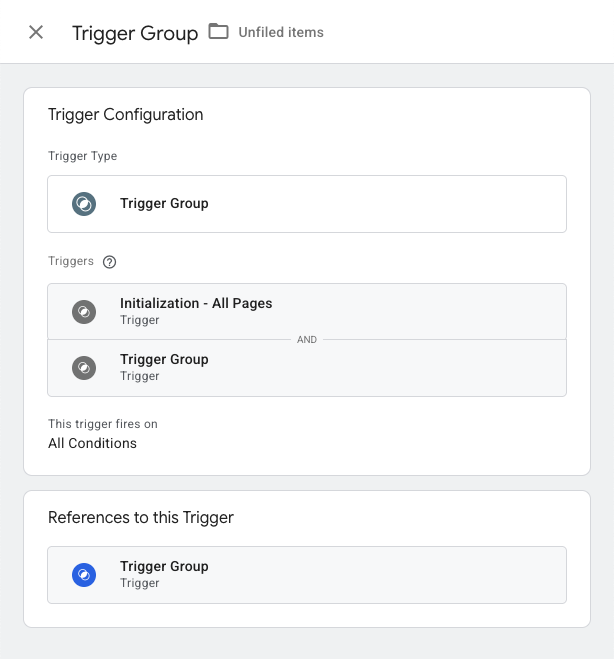
Then I published the container.
The publish step completed successfully. There were no warnings. There were no validation errors. From the GTM UI perspective, everything appeared to be fine.
The Error Only Appeared During Export
The first visible error appeared only when I tried to export the container.
At that point, GTM showed this message:
"A reference cycle was detected. Check each entity's references before trying again."
So there is definitely a reference-cycle check somewhere inside GTM. The problem is that this validation does not appear to run at the point where it would be most useful: when editing, saving, or publishing the Trigger Group.
Exporting a container is a much rarer action than saving or publishing one. Many GTM users may never export a container manually at all.
That creates a practical risk: a self-referencing Trigger Group can sit inside a live GTM container unnoticed.
Import Catches It, But Won't Tell You Where
To understand the boundaries of this validation a little better, I ran one more experiment.
After the export failed, I manually created a dummy container with the same problem baked into one of its Trigger Groups, and then tried to import that container through the GTM UI. This time the check fired immediately. GTM refused the import and showed this message:
"A reference cycle was detected. Check the entity IDs in the input file carefully before trying again."
So the import path is actually stricter than editing, saving, or publishing: it validates up front and blocks the operation. That is the behaviour I would have expected at every step.
The catch is that the message stops there. It does not tell you which entity or entities (tags, triggers, or variables) are actually part of the detected cycle. In a small test container that is a minor inconvenience, but in a real container with hundreds of entities, "check the entity IDs in the input file carefully" is not a practical instruction. You are left to hunt for the cycle by hand.
This is the gap that bothered me the most. GTM clearly knows a cycle exists, and clearly knows enough to block the import, yet it does not surface the specific IDs involved. That is exactly the kind of detail an audit tool should fill in.
Why This Matters
The most obvious issue is that this configuration has no meaningful logical interpretation.
A Trigger Group is supposed to wait until all included triggers have fired at least once. If the Trigger Group includes itself, then it is effectively waiting for itself as one of its own prerequisites.
I have not found an official runtime statement from Google that describes what happens in this invalid state. My best working assumption is that a self-referencing Trigger Group will never fire, because one of its required triggers can never be satisfied.
The more important point is that the UI allows the invalid state to exist at all.
This can happen by accident. When selecting triggers inside the Triggers field, it is possible to misclick and select the current Trigger Group itself. If the container then publishes without errors, there may be no immediate reason to suspect anything is wrong.
That is especially risky in larger containers where Trigger Groups are used to coordinate multiple consent, initialization, event, or timing conditions.
A Deterministic Check Is Safer Than Waiting for Export
Because of this, I added a deterministic check to GTM Refine.
Every GTM container analyzed by GTM Refine is now checked for direct self-references inside Trigger Groups. In simple terms, if a Trigger Group includes its own triggerId in its triggerIds list, that gets flagged.
I also added a deeper cycle check for nested Trigger Groups.
That means GTM Refine does not only detect this:
Trigger Group A -> Trigger Group AIt also detects cases like this:
Trigger Group A -> Trigger Group B -> Trigger Group C -> Trigger Group AThe second case is less obvious in the GTM UI, but it is the same class of problem. There is still a dependency cycle, and the Trigger Group chain eventually points back to where it started.
From an audit perspective, this is exactly the kind of issue that should be caught automatically. It is too easy to miss visually, and relying on a container export attempt is not enough.
What I Would Check in Your GTM Container
If you use Trigger Groups in GTM, I would check for three things:
- Whether any Trigger Group directly references itself.
- Whether any Trigger Group references another Trigger Group that eventually links back to the first one.
- Whether the Trigger Group logic still matches the original business reason for creating it.
The third point matters because Trigger Groups often start as a clean solution, but become harder to reason about as containers grow. A group that once combined two simple conditions can quietly turn into a fragile dependency chain.
Test Your Container
I added this check to GTM Refine so I do not have to rely on export-time validation.
If you would like to test your own GTM container for this issue, you can try GTM Refine. It has a generous free tier, and it now checks Trigger Groups for both direct self-references and nested reference cycles.
This is a small edge case, but it is exactly the kind of edge case that can quietly break tracking while still looking acceptable in the GTM UI.