The Same Trigger Can Be Both Firing and Blocking in Google Tag Manager
A technical look at a GTM configuration that lets the same trigger sit in both the firing and blocking lists of a tag, why that quietly breaks tracking, and how GTM Refine now detects it.
The Short Version
While auditing a client's Google Tag Manager container, I found a tag that listed the same trigger as both a firing trigger and a blocking trigger (an exception).
That should not be a useful configuration. A blocking trigger always wins against a firing trigger, so a tag that fires and blocks on the exact same trigger can never actually fire. Yet GTM let the tag be saved, published, exported, and imported without a single warning.
Like the self-referencing Trigger Group bug I wrote about previously, this is the kind of misconfiguration that looks acceptable in the UI and quietly does the wrong thing in production.
How I Actually Stumbled Into It
I did not find this by reading the tag configuration line by line. I found it because I tried to visualise the container as a graph.
When you draw a GTM container as a graph, tags and triggers become nodes, and the relationship between a tag and a trigger becomes an edge. My renderer assumed something that felt completely safe at the time: that there is at most one edge between a given tag and a given trigger.
That assumption broke. This tag wanted two edges to the same trigger node, one labeled "fires" and one labeled "blocks", because the same trigger ID appeared in both the firing and the blocking lists. The graph could not represent it cleanly, and that is what made me stop and look at the underlying JSON.
What Firing and Blocking Triggers Are Supposed to Do
Google's official Tag Manager help page describes the two concepts clearly:
"A trigger exception (also known as a 'blocking trigger') is a kind of trigger that can be used to block another trigger's ability to fire under certain conditions."
So firing triggers tell a tag when to fire, and blocking triggers (exceptions) tell it when not to fire. The two are meant to describe opposite conditions: one set turns the tag on, the other set holds it back.
A normal example looks like this:
- a tag fires on All Pages;
- an exception blocks it on the thank-you page;
- so the tag fires everywhere except that one page.
That logic only makes sense when the firing condition and the blocking condition are different. It falls apart the moment the very same trigger is on both sides.
Official reference: Firing triggers and trigger exceptions - Tag Manager Help
What I Found in the Container Export
Once the graph pointed me at the tag, the JSON export made the problem obvious. The tag had a firingTriggerId list and a blockingTriggerId list, and the trigger ID 62 appeared in both.
{
"accountId": "1234567890",
"containerId": "987654321",
"tagId": "244",
"name": "Tag - Custom HTML - LinkedIn Conversion - XXXXXX - YYYYYY",
"type": "html",
"parameter": [
{
"type": "TEMPLATE",
"key": "html",
"value": "<img height=\"1\" width=\"1\" style=\"display:none;\" alt=\"\" src=\"https://px.ads.linkedin.com/collect/?pid=XXXXXX&conversionId=YYYYYY&fmt=gif\">"
},
{
"type": "BOOLEAN",
"key": "supportDocumentWrite",
"value": "false"
}
],
"tagFiringOption": "ONCE_PER_EVENT",
"monitoringMetadata": {
"type": "MAP"
},
"consentSettings": {
"consentStatus": "NOT_SET"
},
"firingTriggerId": [
"62"
],
"blockingTriggerId": [
"62"
]
}At first I assumed this had to be an export-only artifact, something the UI would never let you create directly. It is not. You can select the exact same trigger in both sections, and GTM saves it without complaint.
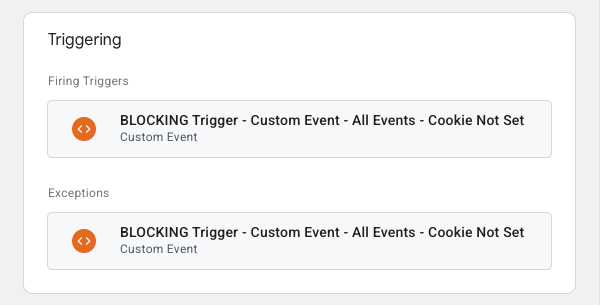
Here is the Triggering section of that tag in the GTM UI. The same trigger sits under Firing Triggers and again under Exceptions:
I Published, Exported, and Imported It Anyway
After the Trigger Group self-reference investigation, I wanted to know exactly how far GTM would let this conflict travel. So I ran the same set of tests on a container that contained this firing/blocking conflict.
- I published the container. It published successfully, with no warnings and no validation errors.
- I exported the container as a JSON file. The export completed cleanly.
- I imported that JSON into a fresh GTM workspace. The import went through with no errors and no warnings whatsoever.
This is the opposite of what I saw with the self-referencing Trigger Group, where at least the export and import steps eventually caught a reference cycle. Here, GTM never objects at any stage. As far as every built-in validation is concerned, a tag that fires and blocks on the same trigger is a perfectly normal tag.
Why This Matters
The logical interpretation here is actually more definitive than in the Trigger Group case.
Because a blocking trigger always wins against a firing trigger, a tag that fires and blocks on the same trigger can never fire. Every time the trigger evaluates to true, the firing condition and the blocking condition are satisfied at the same moment, and the exception takes priority. The tag is effectively switched off, even though the UI presents it as live and ready.
That is a quiet, expensive failure mode. Nothing crashes. Nothing turns red. The tag simply does not collect the conversion, the event, or the pageview it was created for, and your reporting slowly drifts away from reality.
This is exactly why a check like this needs to run before you start chasing a number that looks wrong. When a conversion count or an event volume looks off, the instinct is to dig into the analytics platform. But the real cause often lives one layer down, in the GTM container, and finding it requires a proper container audit first. A tag that can never fire because of a firing/blocking conflict will never show up as an "error" anywhere; it only shows up as a metric that is mysteriously lower than it should be.
A Deterministic Check Is Safer Than Reading Trigger Lists by Hand
Because GTM will not warn you, I added a deterministic check to GTM Refine.
Every container analyzed by GTM Refine is now scanned for tags where the same trigger ID appears in both the firingTriggerId and blockingTriggerId lists. If a trigger is configured as both firing and blocking on the same tag, that tag gets flagged, along with the specific conflicting trigger IDs.
This is a deterministic check on purpose. It does not guess and it does not rely on a model's interpretation. It compares two lists and reports the overlap, so the result is the same every time you run it.
The reason this matters in practice is scale. With one trigger in each section, you might eventually spot the conflict by reading the tag. But firing and blocking lists are rarely that short in real containers. I have audited tags with more than ten triggers in each section, and a single ID that appears in both lists is almost impossible to catch by eye. The graph could not draw it, and a human reading two long lists of trigger IDs will not reliably catch it either. A deterministic comparison will, every single time.
This is the same philosophy behind every other check in the tool: the subtle, easy-to-miss misconfigurations that GTM itself happily accepts are exactly the ones an audit tool should surface automatically.
Test Your Container
I added this check to GTM Refine so that a tag which fires and blocks on the same trigger cannot hide inside a long trigger list.
If you would like to check your own GTM container for this issue, you can try GTM Refine. It has a generous free tier, and it now flags any tag where the same trigger is configured as both a firing trigger and a blocking trigger.
It is a small edge case, but it is the kind of edge case that can silently zero out a tag while still looking completely healthy in the GTM UI.