A Consistent Naming Convention Is the Cheapest Way to Protect Your Tracking ROI
Why inconsistent naming inside a GTM container quietly erodes tracking quality and marketing ROI, and how GTM Refine applies a consistent, segmented naming convention to your tags, triggers and variables, then lets you review every change in a built-in diff viewer.
The Short Version
Most of the GTM containers I am asked to fix are not broken because of one dramatic bug. They are broken because nobody can tell what anything is anymore. A tag called Google Analytics, a trigger called Click 800, a variable called orgInfo — multiply that by a few hundred elements and a few years of hands, and the container becomes a place people are afraid to touch.
That fear is expensive. Tracking only produces reliable numbers when the people maintaining it can reason about the container with confidence. The clearer and more consistent your naming is, the less likely someone is to duplicate a tag, fire it on the wrong trigger, or quietly break a conversion that an entire ad budget depends on.
So this post is about the unglamorous feature at the heart of GTM Refine: applying a consistent naming convention to every tag, trigger and variable in a container, and then letting you review exactly what changed before you trust it.
Naming Quality Is Tracking Quality (and Tracking Quality Is ROI)
It is worth spelling out the chain, because it is easy to dismiss naming as cosmetic.
- Your marketing ROI is only as good as the decisions you make from your reports.
- Those reports are only as trustworthy as the GTM container feeding them.
- That container is only as maintainable as it is legible to the humans (and, increasingly, the AI assistants) working on it.
- Legibility comes from names. A name is the first and often only piece of documentation a tag, trigger or variable ever gets.
When a name says Tag - GA4 Event - G-XXXX - purchase, anyone can see what platform it is, what it does, and which stream it reports to. When it just says Untitled Tag 14, the only way to know is to open it, read every parameter, and hope you understood it. At scale, that difference is the difference between a container you can confidently optimize and one you are scared to publish.
Poor naming does not throw an error. It just slowly taxes every future change until the tax becomes a misfire, a duplicate, or a number no one believes.
The People Maintaining GTM Already Know This
I did not want to argue this point only from my own experience, so here is a recent thread in r/GoogleTagManager asking which GTM setup mistake causes the most reporting pain later.
The top answer lists a whole catalogue of failure modes, and naming sits right in the middle of it — with a very specific qualifier:
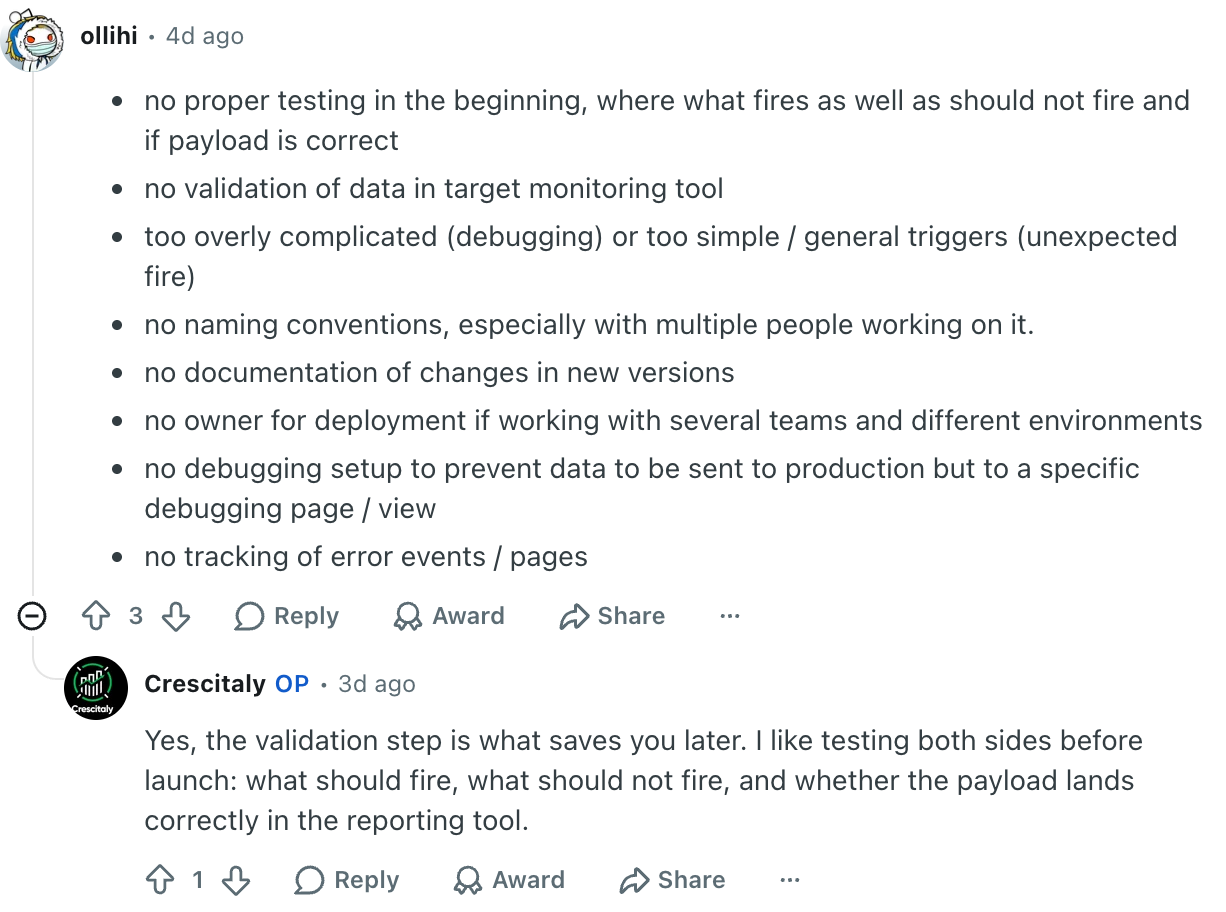
"no naming conventions, especially with multiple people working on it."
That phrase — especially with multiple people working on it — is the whole story. A container you built alone last week is easy to read. A container that has passed through an in-house team, then one agency, then another, then back to you is a different animal entirely. You inherit everyone's shorthand, and none of it agrees.
Another commenter connected the dots between messy naming and the most expensive symptom of all: duplicated reporting numbers.
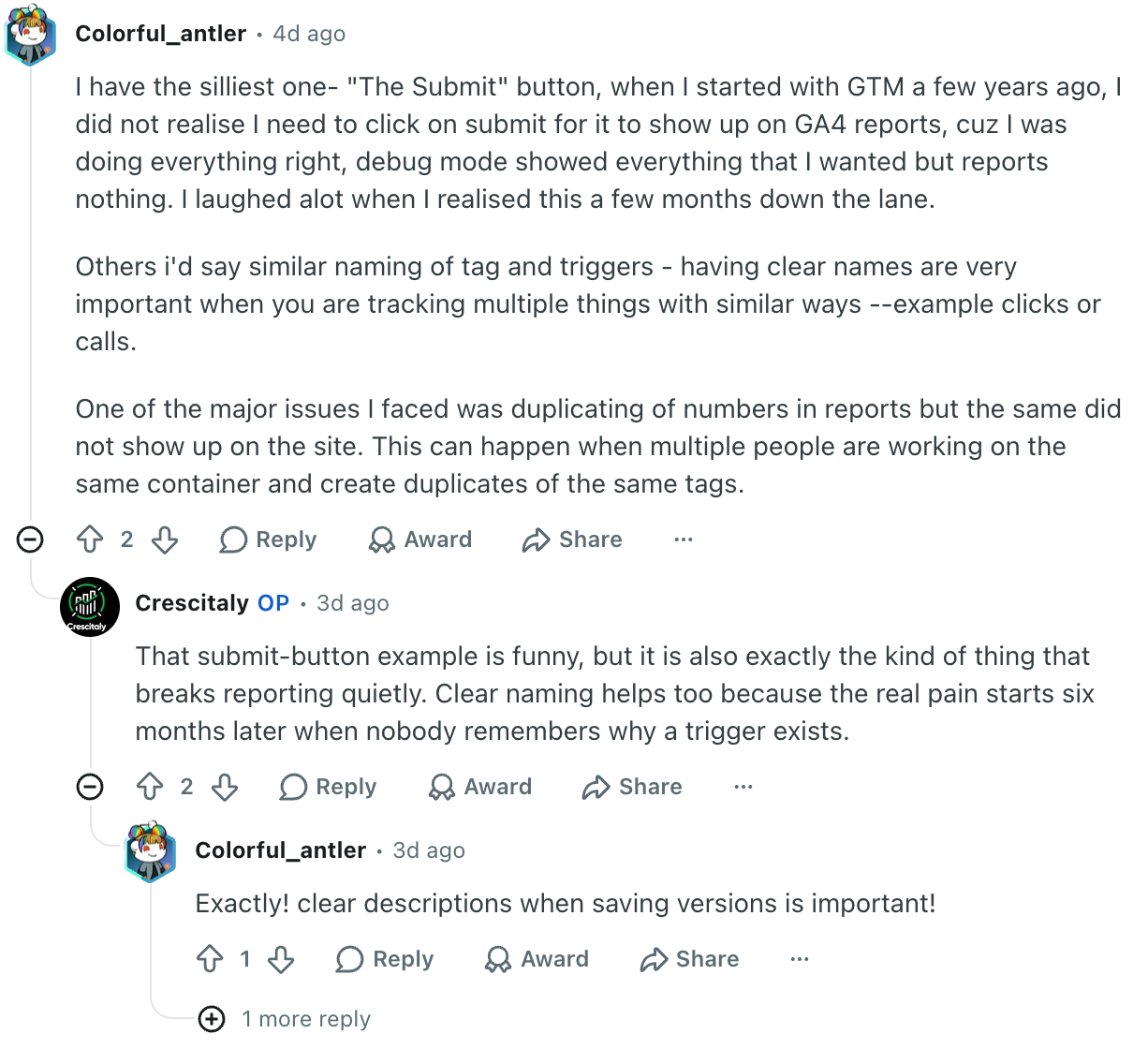
"having clear names are very important when you are tracking multiple things with similar ways ... One of the major issues I faced was duplicating of numbers in reports ... This can happen when multiple people are working on the same container and create duplicates of the same tags."
And the original poster summed up the long-term cost in one line:
"Clear naming helps too because the real pain starts six months later when nobody remembers why a trigger exists."
If you have inherited a container, that is your inbox. Renaming it by hand is precisely the kind of tedious, error-prone job people put off forever — which is exactly why it is worth automating.
Google Recommends This Too
This is not just community folklore. Google's own Tag Manager documentation has a dedicated section on it.
"Tag Manager configurations can grow over time to include a large number of tags, triggers, variables, versions, and workspaces. To keep your container's content organized and easy to work with, we recommend that you use a naming convention..."
Google then gives examples that are explicitly segmented, each part describing a different facet of the element:
Google Ads conversions - Ecommerce website - 2018-01 campaignAnalytics pageviews - Info site + blogFloodlight - Ecommerce website - product categories
Notice the shape: what it is, where it applies, which detail distinguishes it, joined by a consistent separator. That segmented pattern is the backbone of what GTM Refine produces automatically.
Official reference: Organize your containers - Tag Manager Help
Uploading Your Container Unlocks the Choices
You can point GTM Refine at a public website or a GTM ID, but the most direct path is to export your container in the GTM UI (Admin → Export Container) and drop the JSON file onto the home page.
The moment a valid container JSON is selected, a new Optional settings panel appears. This is where GTM Refine quietly becomes more flexible than a one-button tool, because it exposes two independent choices:

- Which elements get renamed — tags, triggers and/or variables.
- Which elements get their notes updated — tags, triggers and/or variables.
These two are deliberately decoupled. You might want to rename everything but leave certain notes untouched, or refresh notes everywhere while protecting a handful of element names a downstream system depends on. Each branch drills down independently into tags, triggers and variables, and from there into individual elements.
The Default Is "Process Everything", and That Is Usually Right
By default, every element is selected for renaming and every element is selected for note updates. For roughly 90% of containers that is exactly what you want — a clean, uniform pass over the whole container is the entire point.
The selection tree exists for the other 10%: the cases where you have been told, explicitly, to leave something alone. Maybe a specific tag name is referenced by an external script, or a particular variable name is hard-wired into a server-side integration. In those situations you simply uncheck that element (or that whole category) and GTM Refine leaves its name or notes exactly as they are. Exclusions are opt-out, applied by hand, on top of a sensible "do everything" default.
Filtering and Sorting for Real-World Containers
A foundation container with twelve elements is easy to scan. A real, inherited container with hundreds of tags, triggers and variables is not. So each category has a filter box (search by name or ID) and a sort control to make picking out specific elements fast.
The filter narrows the list as you type, matching both names and GTM IDs:
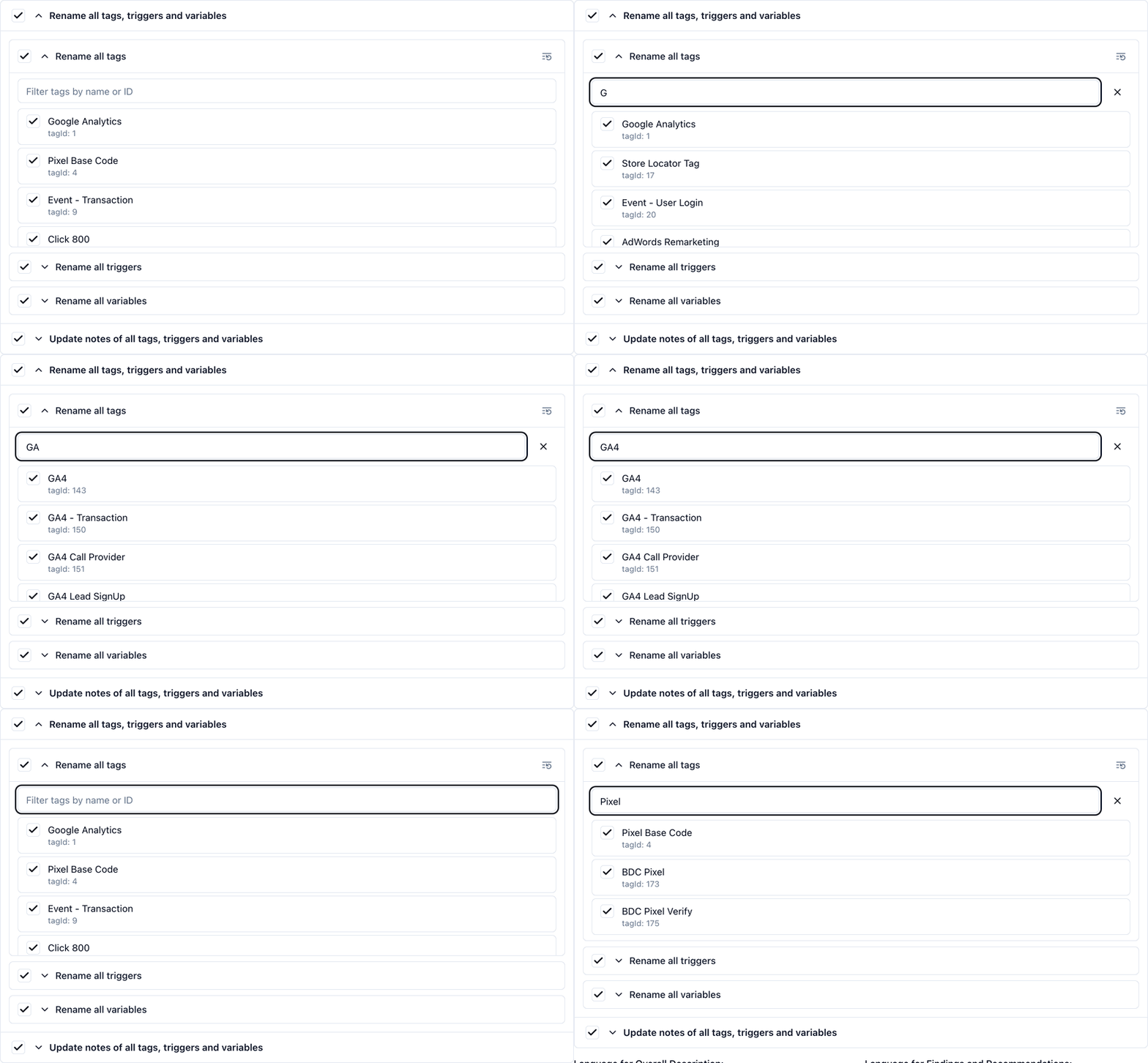
And the sort control cycles through name ascending, ID ascending, name descending, ID descending, and back to the container's original order — so you can line elements up however makes them easiest to find and (de)select:
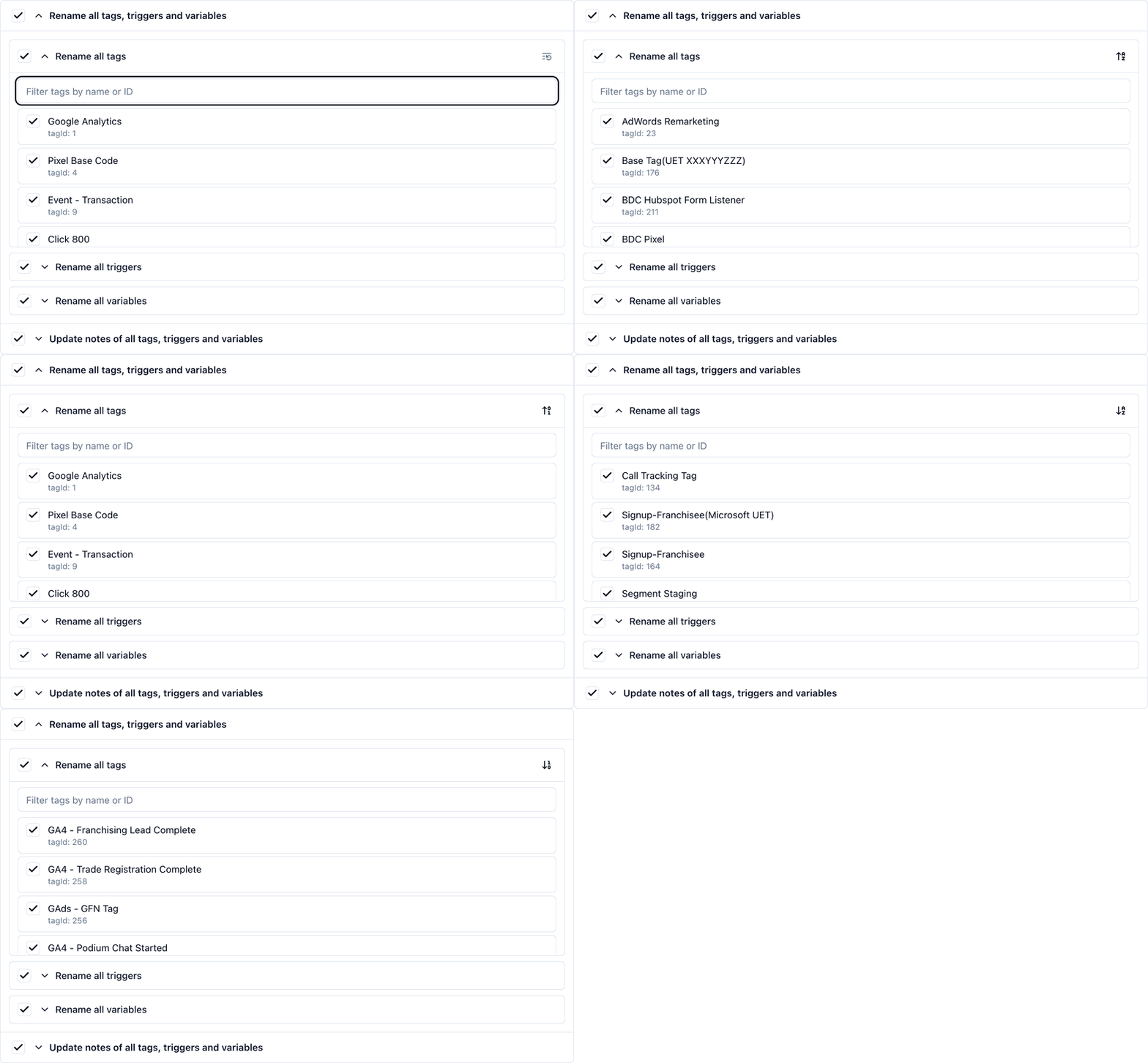
If you have ever tried to find "that one tag" in a sea of similarly named elements, this is the part that saves your afternoon.
What the New Names Actually Look Like
Under the hood, GTM Refine does not just ask a model to "make nice names". It builds names deterministically first, then refines them.
The deterministic pass reads each element's real configuration and assembles a segmented name, with segments joined by -. Every name starts with a fixed, category-revealing prefix:
- Tags begin with
Tag -(andPAUSED Tag -for paused tags). - Triggers begin with
Trigger -(andBLOCKING Trigger -for exception-only triggers). - Variables begin with
Var -.
After the prefix comes a friendly type and then the distinguishing details pulled from the element itself. A GA4 event tag becomes something like Tag - GA4 Event - G-XXXXXXX - purchase. A custom event trigger becomes Trigger - Custom Event - purchase. A Data Layer variable becomes Var - DL - ecommerce.value. When two elements would still collide, the tool layers on additional factual segments, and only as a last resort falls back to the element's own ID (e.g. - ID 143).
Those fixed prefixes do cost a few characters. That is a deliberate trade. Tag - , Trigger - and Var - instantly tell both a human reviewer and an LLM reading the export what class of object they are looking at, without parsing anything else. In a world where AI assistants increasingly read GTM configurations, that explicit, machine-friendly structure adds real depth of functional awareness for very little space.
There is also a second, smarter pass. Names that had to fall back to a trailing - ID <number> are exactly the ones the language model focuses on: it tries to replace that ID with a factual, contextual detail derived from the element's own configuration — for example, inferring a Custom HTML tag's purpose from its HTML body — while preserving every existing segment and never touching protected prefixes like PAUSED Tag or BLOCKING Trigger.
Notes Are Refreshed, Not Wiped
Renaming is only half the documentation story. The other half is what sits in each element's Notes field — and that is where inherited containers often hold their only surviving explanation of why something exists.
When GTM Refine updates notes, it does not throw away what is already there and replace it with a one-line summary. The default behaviour is deliberately conservative:
- Each note starts with a short summary of what the element does (usually under twenty words).
- After that summary, accurate material from the existing note is carried forward — firing conditions, caveats, implementation reminders, URLs, eligibility rules, example values, and anything else that still holds true after the rename pass.
- What does get rewritten are outdated name references: if an old note mentions a tag or variable by its pre-standardization name, that reference is updated to the new name so the note stays internally consistent.
- What does not happen is an aggressive compression of a useful note into something shorter just because a brief summary already exists. Dropping operational context is considered worse than keeping a note that is slightly longer than ideal.
In practice, that means a tag that already has a solid paragraph explaining its business logic will still have that paragraph after GTM Refine runs — prefixed by a clearer summary, with entity names brought up to date. A tag with blank notes gets a useful description from scratch. And if you truly want to leave notes alone, you can uncheck the Update notes branch in the Optional settings panel while still renaming everything else.
A note on where this is heading: the prefix-and-segment notation is intentionally rigid today, but I want it to become more flexible. On the roadmap: optionally dropping the fixed
Tag -/Trigger -/Var -prefixes, optionally adding element IDs at the start or end of a name, and allowing names to be generated in languages other than the current default English. The convention should adapt to your house style, not the other way around.
Yes, an LLM Touches Your Container — No, It Cannot Touch Anything Else
A fair question: if a language model is rewriting names and notes, how do you know it did not quietly change a trigger condition or a measurement ID?
The answer is that GTM Refine deliberately isolates the changes. The renaming and note updates are applied as a tightly scoped patch — only name and notes fields on tags, triggers, variables (plus the container's own name and description) are ever written. Everything else in your container — parameters, firing logic, consent settings, IDs — is carried through untouched. There is one subtlety the tool handles for you: when a variable is renamed, every {{Old Variable Name}} reference across the container is updated to match, so renaming never breaks a reference.
That reference-rewriting is also precisely why a built-in review step matters. Renaming a tag or a variable correctly often means scanning the entire container and replacing old-name occurrences with the new name. Done by hand, that is one of the most error-prone operations in all of GTM — miss one reference and a variable silently resolves to undefined.
The Diff View: See Every Change in Red and Green
So before you trust anything, GTM Refine gives you a Diff View tab on the results screen. It puts the original container JSON next to the refined JSON and highlights every change line-by-line — removed content in red, added content in green — using a proper side-by-side (or unified) diff. You can flip between split and inline modes, and there is even a Load Data option to paste or upload two arbitrary JSON files and compare them directly.
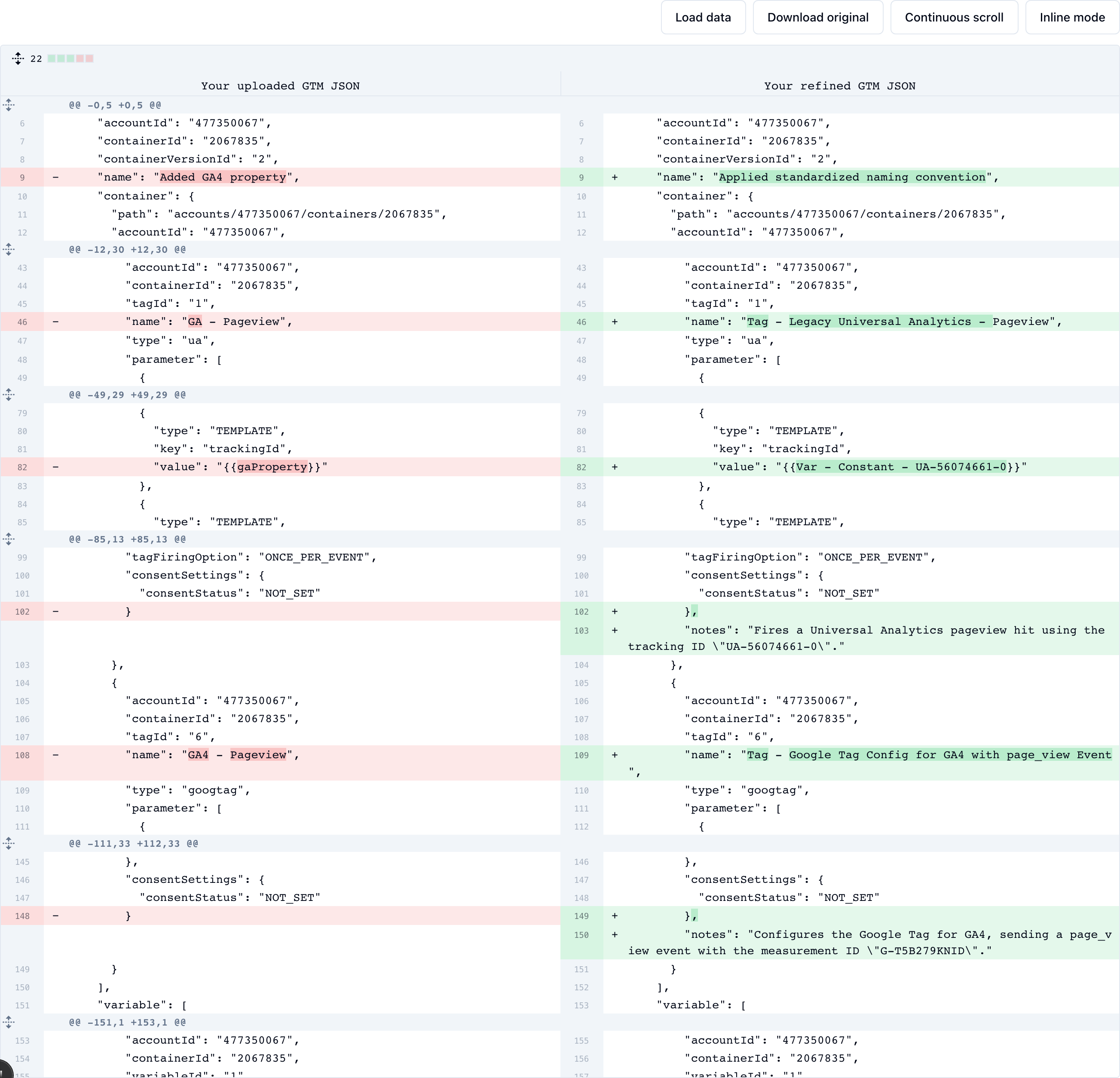
In the screenshot above, the left side is your uploaded export and the right side is the refined version. You can see a tag name change from GA - Pageview to Tag - Legacy Universal Analytics - Pageview, a variable reference updated to match a renamed constant, and new notes fields added underneath — all without any of the surrounding trigger IDs, parameters or firing logic shifting.
The point is certainty. You should not have to take "the names were standardized and nothing else changed" on faith. You can see that only name and notes lines turned green and red, and that the trigger references, parameters and IDs in between stayed exactly as they were.
Could you do this comparison elsewhere? Absolutely — diffing two JSON files is something many of you already do in Visual Studio Code, a dedicated diff tool, or a command line. I embedded it directly into GTM Refine on purpose: I wanted the whole loop — upload, standardize, review the diff, export — to live in one place, so applying a naming convention feels like a single, reviewable step rather than a project that spills across five tools.
Apply a Consistent Naming Convention to Your Container
If your container has been around the block — through multiple people, multiple agencies, and multiple "I'll fix the names later" promises — a consistent naming convention is the cheapest, lowest-risk upgrade you can make to the quality of your tracking, and therefore to the ROI of everything that depends on it.
You can apply one to your own container with GTM Refine. Export your container, drop the JSON in, keep the default "process everything" pass (or carve out the few exceptions you need), let it standardize your tags, triggers and variables, and then review every change in the Diff View before you export it back. It has a generous free tier, so you can see what your container looks like with clear names before you commit to anything.
Clear names will not make your reporting interesting. They will just make it trustworthy — which, six months from now, is exactly what you will wish someone had done.