Mixed Data Layer Variable Versions in GTM: When It Is Safe, When It Is Not, and What to Convert
Most containers that mix version 1 and version 2 Data Layer Variables inherited the mix rather than chose it. Here is when converting v1 to v2 is safe, when the version genuinely changes the value, the vUnknown edge case in very old containers, and how GTM Refine surfaces all of it.
The Short Version
When a Google Tag Manager container mixes version 1 and version 2 Data Layer Variables, it is almost always a sign of inherited configuration rather than a deliberate decision. New variables default to version 2; older ones, copied variables, and imported ones drag version 1 along with them. The next owner is reluctant to touch anything, so the mix survives.
Most of that mix is harmless and safe to standardize on version 2. But not all of it. There is a real, legitimate reason version 1 still exists — mostly around ecommerce arrays like ecommerce.items, where a version 1 read and a version 2 read can return genuinely different values depending on what was pushed before.
So the goal of this post is not "delete every version 1 variable." It is to tell apart the cases where the version makes no difference from the cases where it changes what your tags actually receive — and to show a couple of experiments I ran in GTM Preview to prove it.
What the Two Versions Actually Do
Google's documentation for the Data Layer Variable type describes the core difference in how dots in a key name are interpreted:
"Version 1: allow dots in key names... interpret the name of the key as
a.b.c.""Version 2: interpret dots as nested values... as three nested levels:
{a: {b: {c: value}}}."
Official reference: User-defined variable types for web - Tag Manager Help
In plain terms, version 1 looks for a literal key — the whole string, dots and all. Version 2 treats each dot as a step deeper into an object, and it reads from GTM's merged internal data model, recursively merging nested objects as new values are pushed.
Simo Ahava explained the practical consequence years ago: with version 2, repeated ecommerce pushes can leave stale data merged into a later action, while version 1 reads only the most recent push for that key. That difference is sometimes the entire reason a version 1 variable was created.
Reference: Data Layer Variable Versions Explained | Simo Ahava
When Mixing Is Harmless (and Conversion Is Safe)
The version setting only has something to disagree about when the key name contains a dot. So two large groups of variables are safe to standardize on version 2.
1. Flat keys with no dots. If the Data Layer Variable name is something like pageCategory, userId, or transactionId, there is nothing to interpret. Version 1 and version 2 read the same single key and return the same value. Converting these from version 1 to version 2 changes nothing at runtime.
2. GTM's own gtm.* auto-event keys. Names like gtm.elementId, gtm.elementClasses, gtm.elementUrl, and gtm.element are pushed by GTM's own JavaScript engine when an auto-event trigger (a click, a form submit, and so on) fires. GTM writes them as flat keys — the literal string gtm.elementId, not a nested { gtm: { elementId: ... } } structure. Because the value lives under that flat key, a version 1 read and a version 2 read land on the same value. These are safe to convert too.
I tested this on a real website in GTM Preview. I created matching version 1 and version 2 Data Layer Variables for gtm.element and clicked a search field. Both versions returned the exact same element:
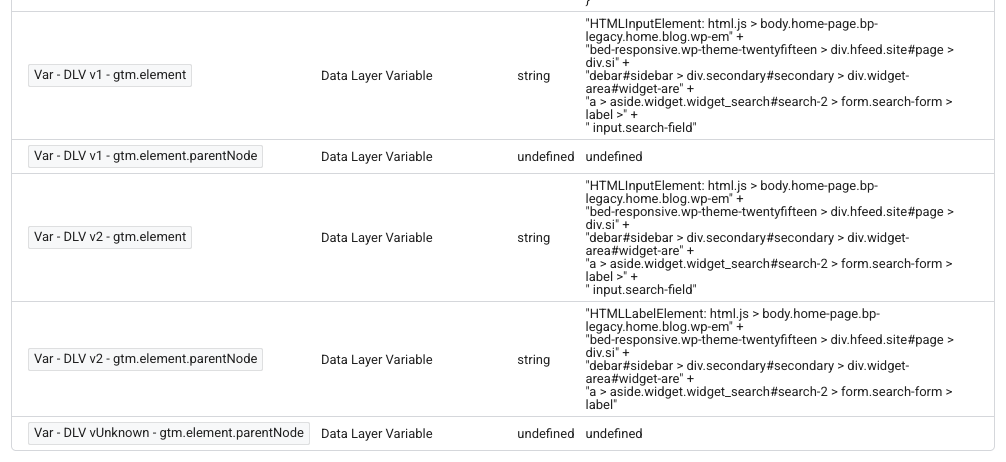
In the screenshot, gtm.element resolves identically for version 1 and version 2 — the clicked input.search-field. (Those variables are named with a DLV prefix because I hand-created them for the test; GTM Refine's own convention uses DL, which I will come back to.)
When the Version Genuinely Changes the Value
Now the cases that actually matter — where converting blindly can change tracking.
1. Nested and array-like ecommerce keys. This is the legitimate reason version 1 survives. Consider ecommerce.items. GTM Enhanced Ecommerce code typically pushes the ecommerce object repeatedly across a page — an impression list, then a product detail, then an add-to-cart. With version 2, those pushes recursively merge, so a later read can include items from an earlier step. With version 1, the read reflects only the most recent push. Same key name, different value, depending entirely on what was pushed before. If a previous owner used version 1 on ecommerce specifically to avoid payload multiplication, switching it to version 2 can silently inflate or mix your ecommerce data. This is the one place to slow down and verify intent before converting.
2. Stepping into an object's properties. Look again at the experiment screenshot. I also created variables for gtm.element.parentNode — going one level deeper than the key GTM actually pushes:
gtm.element.parentNodeon version 1 →undefined. Version 1 looks for a literal key namedgtm.element.parentNode, which GTM never pushed, so it finds nothing.gtm.element.parentNodeon version 2 → the parent node (anHTMLLabelElementwrapping the search field). Version 2 resolvesgtm.elementto the live DOM node and then steps into its.parentNodeproperty.
This is the opposite of harmless: the two versions return completely different results, and only version 2 works. It also corrects a common misconception that version 2 dot notation cannot reach DOM properties. It can. GTM Preview displays the element as a readable string, but the underlying value is a real object, which is why version 2 can traverse into it and version 1 cannot.
The takeaway: dots are the dividing line. No dots, or a gtm.* key GTM pushes directly — safe. A dot that crosses into merged ecommerce state or into an object's properties — the version is load-bearing, and you need to know which behavior the dependent tag relies on.
The vUnknown Edge Case: A Version That Is Not Set at All
There is a rarer situation worth knowing about. A container can be old enough — or a variable imported from an old enough archived export — that a Data Layer Variable has no dataLayerVersion key at all:
{
  "variableId": "39320",
  "name": "Var - DLV vUnknown - gtm.element.parentNode",
  "type": "v",
  "parameter": [
    {
      "type": "TEMPLATE",
      "key": "name",
      "value": "gtm.element.parentNode"
    }
  ],
  "formatValue": {}
}
There is no version field because, originally, Data Layer Variables had no versions at all. So how does it behave? Like version 1. In the same Preview experiment, the version-less gtm.element.parentNode variable returned undefined, exactly like its version 1 counterpart — which makes sense, since version 1 is the original, pre-versioning behavior.
The confusing part is what the GTM UI shows. Open that same version-less variable in the editor and GTM displays it as Version 2:
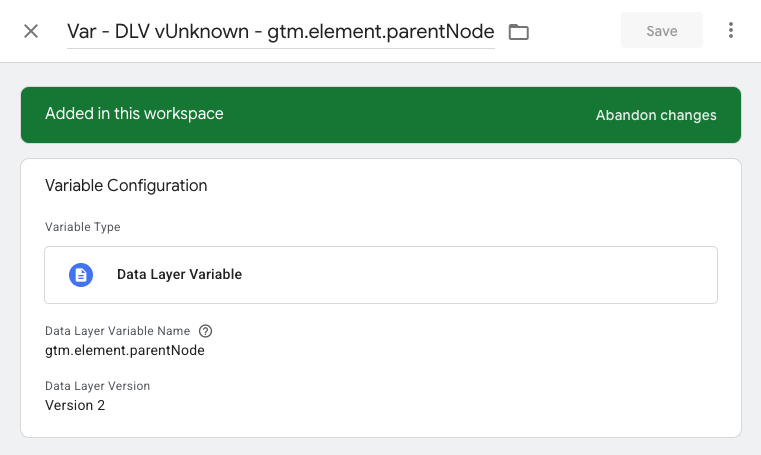
So you get version 2 in the interface and version 1 behavior in production — a genuine trap for anyone debugging by reading the UI. And the trap travels: if you export the container to JSON before making any real change to that variable, the export still omits the dataLayerVersion key entirely, so the version-less variable carries straight into the next container that imports it. The good news is that the ambiguity collapses the moment you make any real change to the variable: GTM then writes a concrete dataLayerVersion and the displayed version starts matching reality. This is an edge case, but it is exactly the kind of quiet mismatch a container audit should make visible instead of leaving you to discover it mid-incident.
How GTM Refine Surfaces All of This
GTM Refine handles mixed and version-less Data Layer Variables in two complementary ways.
The audit notes flag every Data Layer Variable explicitly set to version 1, with severity based on the key shape:
- Flat keys (e.g.
pageCategory) → low severity. Usually safe to convert; the value does not change. - Nested or array-like keys (e.g.
ecommerce.items,ecommerce.purchase.actionField.id) → medium severity. These are the load-bearing ones to review before converting.
The notes also call out duplicate keys — the same dataLayer key existing as both a version 1 and a version 2 variable — because that is the hardest inconsistency to catch by eye. (Note that the version-1 audit deliberately reports variables set to version 1; version-less variables are surfaced through naming and the export instead, described next.)
The naming convention encodes the version directly into each variable name, so the mix is visible in the variable list without opening anything. As part of GTM Refine's consistent naming convention pass, Data Layer Variables are labelled by the container's overall version situation:
- Only version 2 variables → names stay
Var - DL - <key>with no version token (the modern default, nothing to flag). - Any version 1 or version-less variable present → every Data Layer Variable gets an explicit token:
Var - DL v1 - <key>,Var - DL v2 - <key>, orVar - DL vUnknown - <key>.
That vUnknown token is the fix for the trap above: a version-less variable that GTM would otherwise show as "Version 2" is named honestly, so you can see at a glance that its version was never actually set. The same vUnknown value appears in the Version column of GTM Refine's Excel export, alongside the variable's key and default-value settings.
In the GTM UI, the version itself is a single dropdown that is easy to overlook:
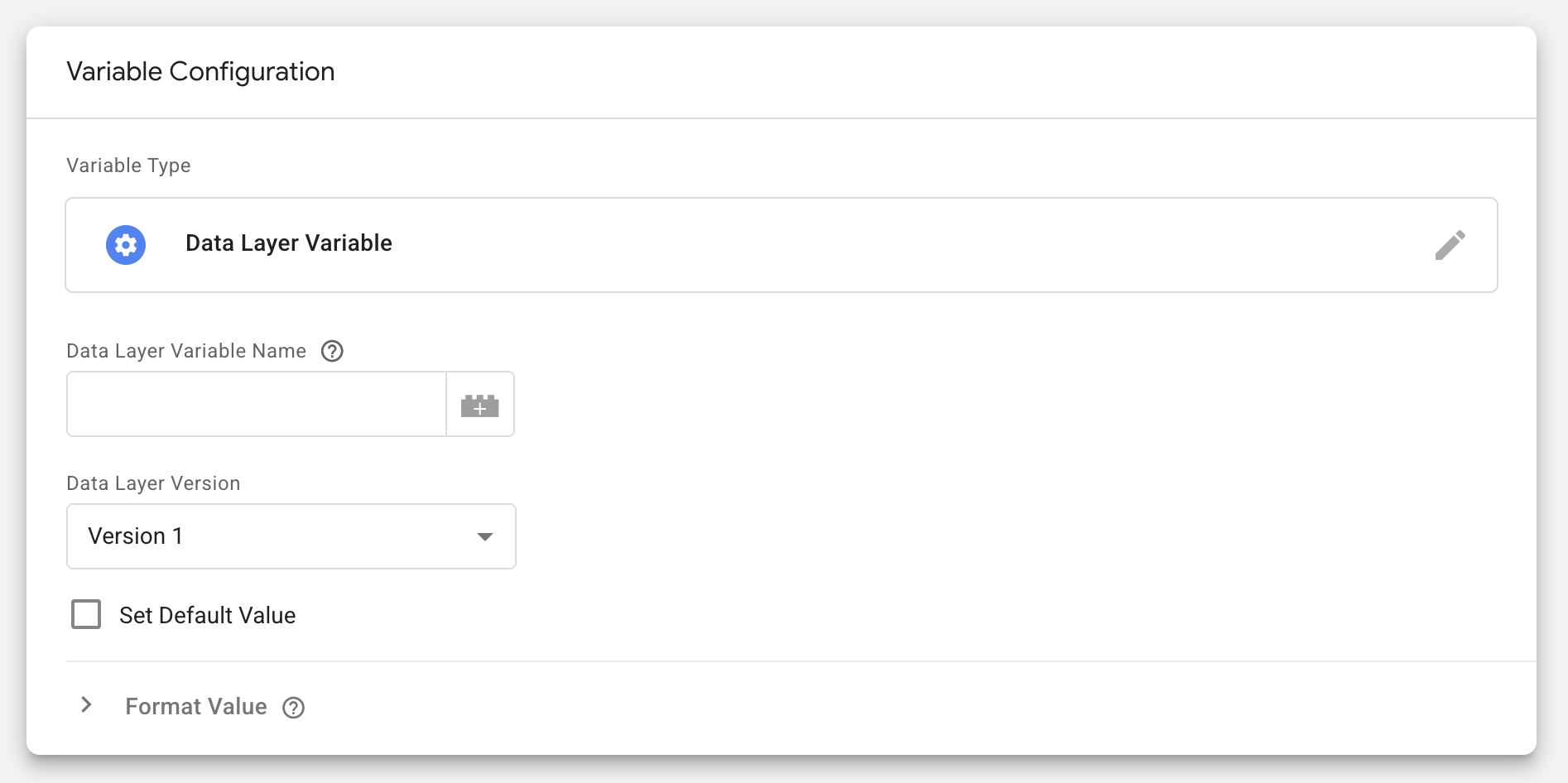
That is the field GTM Refine inspects across every Data Layer Variable in your container — turning a setting you would otherwise have to open one variable at a time into something you can read straight off the variable list and the export.
Audit Your Container
If you inherited a GTM container, you almost certainly inherited a version mix too — and probably do not know which Data Layer Variables are version 1, which are version-less, and which of those actually matter.
Upload your container export to GTM Refine and run an audit. It flags version 1 variables by risk, highlights keys that exist in both versions, names every Data Layer Variable so the mix is visible at a glance, and reports version-less vUnknown variables before they confuse anyone. It has a generous free tier, so you can see exactly where you stand before changing a thing.
Standardizing your Data Layer versions will not make your reports more interesting. It will make them easier to trust — and it will stop the safe conversions and the risky ones from looking identical in the variable list.