The Hidden page_view Behaviour Inside Google Tag and GA4 Event Tags
Google Tag and GA4 Event tags can hide important behaviour behind inner configuration settings: automatic page_view emission, send_page_view suppression, and server-side GTM routing through server_container_url or transport_url. Here is why those details belong in the tag name during a GTM audit.
The Short Version
A Google Tag in GTM is easy to mistake for a passive configuration tag. The name often says something like GA4 - Config, the tag type says Google Tag, and the trigger says All Pages. Nothing in that first view tells you whether the tag is expected to emit a page_view event, suppress the automatic pageview, or route hits through a server-side GTM endpoint.
That behaviour usually lives one or two clicks deeper, inside Configuration settings, Shared event settings, or a referenced settings variable. Sometimes the most important line is not a line at all: for a GA4 Google Tag, the absence of send_page_view: false means the tag will send the automatic page_view you were trying to account for.
So this post is a practical extension of the earlier post about consistent GTM naming conventions. Naming is not just tidiness. For Google Tag and GA4 Event tags, accurate naming can surface behaviour that would otherwise stay buried inside the tag editor.
Google Tag Is Not a Silent Config Tag
The word "config" is a little dangerous here. It sounds passive, as if the tag exists only to define settings for later event tags. That is not how the Google Tag works.
Google's own developer documentation describes the config command as the way to establish data flow between a website and Google products. It also says that adding send_page_view: false prevents a Google Analytics pageview from being automatically sent:
gtag('config', 'TAG_ID', {'send_page_view': false});Official reference: Configure Google products and send event data - Google for Developers
The same page is careful about product-specific behaviour:
"Depending on the product specified in
TAG_ID, theconfigcommand may also initiate certain behavior for that product."
That is the mental model to bring into GTM. A Google Tag can configure GA4, Google Ads, Floodlight, or a unified GT- destination, but "configuration" does not mean "no hit is sent." In practical audit terms, you should treat a Google Tag as capable of emitting pageview behaviour for both GA4 and Google Ads destinations unless the configuration proves otherwise. In a GA4 setup, it can emit a page_view. In Google Ads setups, the Google Tag is also the base tag that powers remarketing and destination behaviour, so it is not a silent settings container there either. Google Ads was called Google AdWords until the 2018 rebrand.
That old "AdWords" vocabulary still appears in plenty of inherited containers, old notes, agency documentation, and analyst muscle memory. The product name changed, but the audit problem did not: the tag list alone often does not tell you what the tag actually does.
The Default Is Hidden in the Absence
Here is the kind of tag that creates the audit problem:
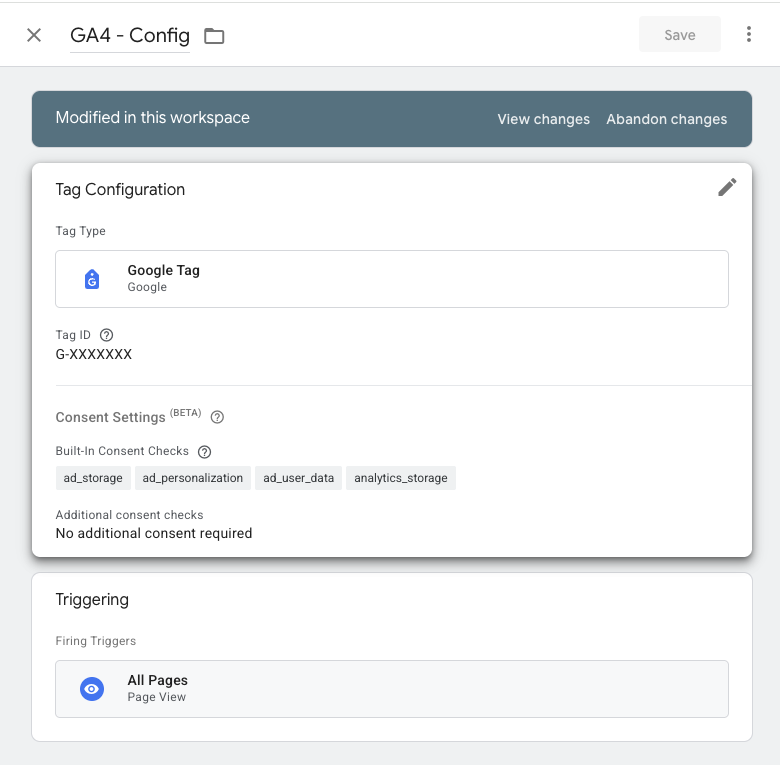
At a glance, an analyst can see the tag type, the destination ID, the consent checks, and the trigger. They cannot see send_page_view. And that is exactly the point.
When send_page_view is missing from the visible configuration, you have to remember the default behaviour: unless the automatic pageview is explicitly disabled, this GA4 Google Tag will send a page_view event when it runs. To confirm it, you need to open the tag's settings and inspect the actual configuration parameters.
In a small container, that is annoying. In an inherited enterprise container with dozens of Google Tags, duplicated configuration tags, mixed GA4 and Google Ads destinations, and settings variables layered on top, it becomes a real audit tax.
What You Have to Check Manually
When auditing this by hand, the tag list is not enough. A careful reviewer has to open each relevant tag and answer a chain of questions:
- Is this a Google Tag (
googtag) or a GA4 Event tag (gaawe)? - Is the destination a GA4 ID (
G-), a unified Google Tag ID (GT-), a Google Ads ID (AW-), or something else? - Does the Google Tag have a Configuration settings table?
- Is there a
send_page_viewrow? - If yes, is it set to
false, or is it just redundantly set totrue? - Does the tag reference a Google Tag Configuration Settings variable?
- If it does, does that variable contain
send_page_view,server_container_url, ortransport_url? - For GA4 Event tags, does the tag have its own event settings, or does it inherit settings from a Google Tag Event Settings variable? Direct tag-level edits can override inherited settings for that tag only, so the effective value is not always the value in the shared variable. Google's event settings documentation describes the inherited-settings workflow, including showing inherited settings, editing an inherited parameter for a tag, and resetting it: Reuse event settings in Google Tag Manager.
- If the tag lacks its own server-side routing parameter, is it sequenced after a matching Google Tag that supplies one?
That is a lot of clicking just to understand whether the tag list is telling the truth.
The worst part is that the most important answer can be "there is no row." In other words: the absence of send_page_view: false is meaningful configuration.
send_page_view=true Is Usually Noise
There are three practical states to distinguish:
- No
send_page_viewrow: default automatic pageview behaviour applies for a GA4 Google Tag. send_page_view: false: the automatic pageview is intentionally suppressed.send_page_view: true: usually redundant, because it restates the default.
The third case matters because redundant configuration is not harmless in audits. A container full of explicit send_page_view=true rows makes it harder to see the few tags where send_page_view=false is genuinely load-bearing. It also trains people to treat the row itself as the signal, when the real signal is the effective behaviour.
So the question is not "does this tag contain the parameter?" The question is "will this tag emit a page_view automatically?"
That is why a name like this is more useful than GA4 - Config:
Tag - Google Tag Config for GA4 with page_view EventAnd this is more useful still when the pageview is intentionally suppressed:
Tag - Google Tag Config for GA4 without page_view EventThe analyst does not need to open the tag to remember the default. The expected behaviour is right there in the list.
This Is Especially Useful for Duplicate Pageviews
The hidden default becomes more than an inconvenience when you are looking for duplicate pageviews.
A common inherited setup looks like this:
- a Google Tag firing on All Pages, silently sending the default
page_view, and - a GA4 Event tag named something like
GA4 - page_view, also firing on page load.
If both names are vague, the tag list does not warn you. You have to open the Google Tag, infer the missing send_page_view=false, then compare it with the GA4 Event tag.
With behaviour-aware names, the pattern is obvious:
Tag - Google Tag Config for GA4 with page_view Event - G-XXXXXXX
Tag - GA4 Event - G-XXXXXXX - page_view
That does not automatically prove the implementation is wrong. Some containers intentionally send custom pageviews, especially on single-page apps or consent-gated flows. But it does tell the auditor where to look first. The name turns a hidden behaviour into a visible hypothesis.
ssGTM Routing Hides the Same Way
The same problem appears with server-side GTM.
Google's Tag Manager documentation explains that to send events to a Tag Manager server container, you configure the server_container_url parameter in the Google Tag's configuration settings. Official reference: Set up Google Analytics in Tag Manager - Tag Manager Help
In GTM exports and older/native contexts, you may also see transport_url or transportUrl. For audit purposes, these all point to the same class of behaviour: the hit is expected to route through a first-party server-side tagging endpoint instead of going directly from the browser to Google's collection endpoint.
Again, that setting can be direct or inherited:
server_container_urlcan sit directly in a Google Tag's Configuration settings.transport_urlcan appear in a tag or settings table.- A Google Tag can reference a Google Tag Configuration Settings variable (
gtcs) that contains the server endpoint. - A GA4 Event tag can reference a Google Tag Event Settings variable (
gtes) or carry its own event settings. - A GA4 Event tag may also rely on sequencing through a matching Google Tag that has the server endpoint configured.
This is not easy to understand from names like:
GA4 - Config
GA4 - Purchase
GA4 Event - Lead
Those names do not tell you whether the hit is client-side or server-routed. Worse, two tags can look like siblings while only one is actually routed through ssGTM.
The Missing ssGTM Parameter Is an Audit Finding
This is where behaviour-aware naming saves real time.
Suppose you are auditing a container where the client expects GA4 data to go through server-side GTM. You find a Google Tag that has server_container_url configured. Good. Then you find a GA4 Event tag for purchase.
The question is not just "does the purchase tag fire?" It is:
- Does this GA4 Event tag have its own
server_container_urlortransport_url? - If not, is it sequenced after the matching Google Tag that has the server endpoint?
- Does the matching Google Tag use the same effective GA4 measurement ID?
- If neither is true, is this event bypassing ssGTM while the rest of the setup is server-routed?
That is a subtle but important audit path. A tag can be functionally correct in isolation and still be inconsistent with the container's intended collection architecture.
Names that include (ssGTM) make that pattern much easier to scan:
Tag - Google Tag Config for GA4 (ssGTM) with page_view Event - G-XXXXXXX
Tag - GA4 Event (ssGTM) - G-XXXXXXX - purchase
Tag - GA4 Event - G-XXXXXXX - generate_lead
In that list, the odd one out is visible before you open anything.
Where GTM Refine Fits In
This is the product part, but it is not magic. GTM Refine is doing the work an analyst would otherwise do by hand: reading the tag type, destination ID, configuration settings, referenced settings variables, and sequencing relationships, then reflecting the effective behaviour in the standardized name where it can be determined.
For Google Tags, the naming convention can distinguish destination buckets such as:
Google Tag Config for GA4Google Tag Config for UnifiedGoogle Tag Config for GAdsGoogle Tag Config for Floodlight
It can also add behaviour markers:
with page_view Eventwithout page_view Event(ssGTM)
For GA4 Event tags, (ssGTM) can surface when the event is directly configured for server-side routing or when it is sequenced through a matching server-routed Google Tag.
The result is not that you never inspect tag settings again. You still should, especially before publishing changes. The result is that your first pass through the container becomes much faster. The names tell you which tags deserve attention instead of forcing every Google Tag and GA4 Event tag to become a little investigation.
The Point of Naming Is Behavioural Compression
The previous naming-convention article made the general case: clear names make a GTM container easier to maintain. This is the more specific version of the same argument.
A good GTM name compresses behaviour. It takes a handful of inner settings, defaults, references, and relationships, and turns them into a readable label:
Tag - Google Tag Config for GA4 (ssGTM) without page_view EventThat name tells you four things before you click:
- it is a tag,
- it is a Google Tag configuration for GA4,
- it routes through server-side GTM, and
- it should not automatically emit a
page_view.
That is not cosmetic. That is audit context.
Audit Your Container
If you are reviewing a GTM container with Google Tags, GA4 Event tags, Google Ads tags, or server-side GTM routing, do not rely on old names like GA4 - Config to describe the implementation.
Export the container, upload it to GTM Refine, and review the standardized names alongside the diff. Look for Google Tags that explicitly say with page_view Event, GA4 Event tags named page_view, and tags that do or do not carry the (ssGTM) marker.
You may still need to open individual tags to confirm intent. But you should not have to open every tag just to learn the basics. A naming convention that surfaces hidden Google Tag behaviour turns the audit from excavation into review.